cleanfig
Gallery
cleanfig is designed to stay compact at the API level: create a figure, select a panel, add layers, then export.
This gallery shows the shipped examples together with the actual plotting code patterns used to build them.
Built-in continuous colormaps currently available in cleanfig: magma, gray, bone, plus a richer Fabio Crameri subset including batlow, vik, roma, broc, cork, lapaz, lajolla, tokyo, navia, oslo, and more.
Fabio Crameri citation: Crameri, F. (2023). Scientific colour maps (8.0.1). Zenodo. https://doi.org/10.5281/zenodo.8409685
What The API Looks Like
The core workflow is always the same: cf.figure(...), fig.panel(row, col), then methods such as line, scatter, field, violin, box, legend, and colorbar.
The examples below are intentionally small and readable. They show how the library is meant to be used in real scripts, not just what the outputs look like.
fig.panel(...)line, scatter, field, violinbasic_line
Minimal line + scatter figure with math-aware labels and a compact legend.
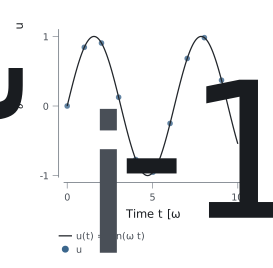
import numpy as np
import cleanfig as cf

x = np.linspace(0.0, 10.0, 200)
y = np.sin(x)

fig = cf.figure(width="single", height=3.4, grid=(1, 1), theme="light")
ax = fig.panel(0, 0)
ax.line(x, y, label=r"$u(t) = \sin(\omega t)$")
ax.scatter(x[::20], y[::20], size=4.2, label=r"$u_i$")
ax.xlabel(r"Time $t$ [$\omega^{-1}$]")
ax.ylabel(r"$\partial_t u$")
ax.legend()
weather_timeserie_check
Minimal stacked weather time series example showing temperature, rainfall, and snow height across a few altitude bands.
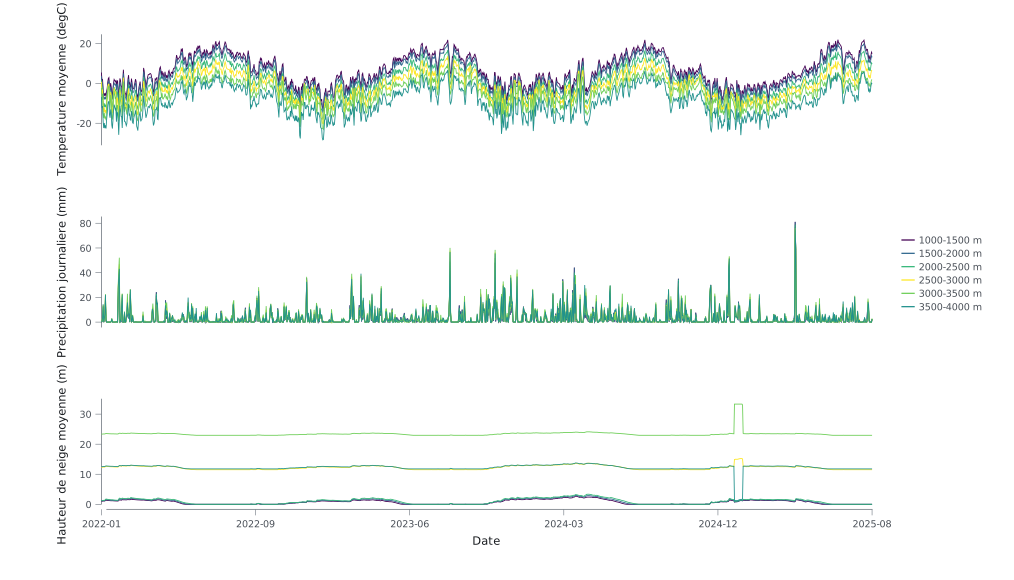
from pathlib import Path

import numpy as np
import cleanfig as cf

data = np.genfromtxt(Path("examples/Data/weather_timeserie_check.csv"), delimiter=",", names=True, dtype=None, encoding="utf-8")
fig = cf.figure(layout="timeseries", height=6.0, grid=(3, 1))
notebook_example
Notebook-friendly scatter example with an inline display path when IPython is available.
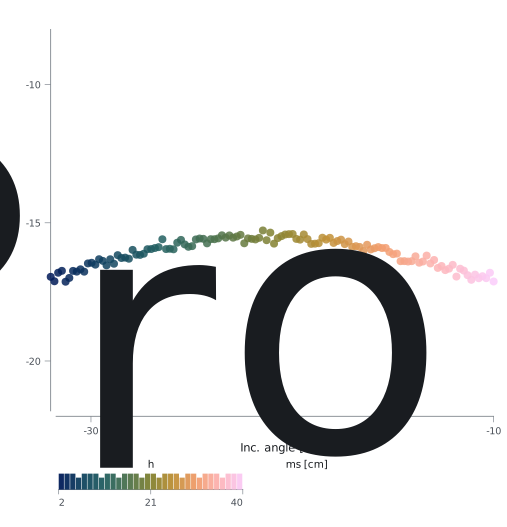
from pathlib import Path

import numpy as np
import cleanfig as cf

fig = cf.figure(width="double", height=6.0, grid=(1, 1), theme="light")
ax = fig.panel(0, 0)
sc = ax.scatter(local_incidence_angle_deg, satellite_sigma0_vv_db, color=lc_cm, size=6, alpha=0.85)
ax.colorbar(sc, label="h_rms [cm]", placement="inside-left")
four_panels_light
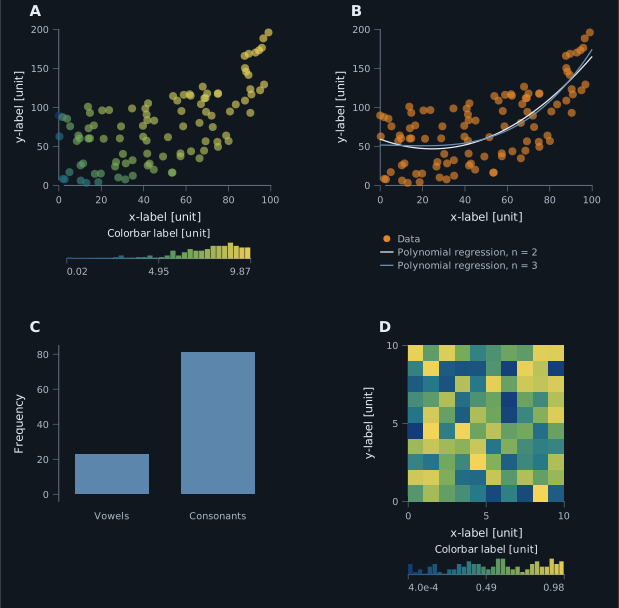
Publication-theme multi-panel layout mixing mapped scatter, regression lines, bars, and a field plot with colorbar.
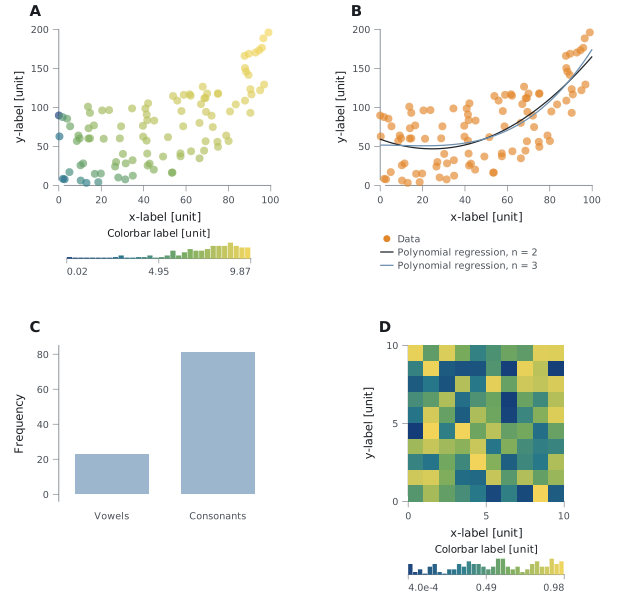
fig = cf.figure(width="double", height=8.0, grid=(2, 2), panel_labels=True, theme="publication")

ax = fig.panel(0, 0)
sc = ax.scatter(x, y, color=np.log(x * y), size=6, alpha=0.65)
ax.xlabel("x-label [unit]")
ax.ylabel("y-label [unit]")
ax.limits(x=(0, 100), y=(0, 200))
ax.colorbar(sc, label="Colorbar label [unit]", placement="inside-left")

ax = fig.panel(1, 0)
ax.bar(["Vowels", "Consonants"], [23, 81])
ax.ylabel("Frequency")

ax = fig.panel(1, 1)
field = ax.field(x_map, cmap="batlow")
ax.xlabel("x-label [unit]")
ax.ylabel("y-label [unit]")
ax.colorbar(field, label="Colorbar label [unit]")
four_panels_dark
Same figure logic, same script entry point, but with the optional dark presentation theme.
from four_panels import main

if __name__ == "__main__":
    main(theme="dark", stem="four_panels_dark")
theme argument does.
violin_box_light
Distribution comparison with a violin panel, mapped points, and a companion box plot.
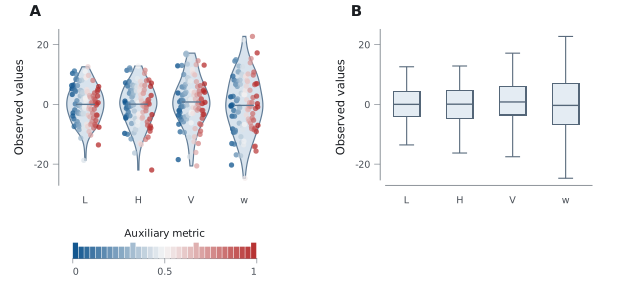
all_data = [np.random.normal(0, std, 100) for std in range(6, 10)]

fig = cf.figure(width="double", height=4.0, grid=(1, 2), panel_labels=True, theme="publication")

ax = fig.panel(0, 0)
metric = [np.linspace(0, 1, len(group)) for group in all_data]
handle = ax.violin(
    all_data,
    labels=["L", "H", "V", "w"],
    show_median=True,
    points=True,
    point_color=metric,
    point_cmap="vik",
)
if handle is not None:
    ax.colorbar(handle, label="Auxiliary metric")

ax = fig.panel(0, 1)
ax.box(all_data, labels=["L", "H", "V", "w"])
esec_dual_y_light
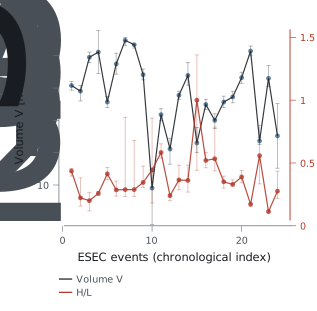
Dual-Y geophysical example built from a bundled ESEC catalog with pandas, log scaling, and uncertainty bands.
df = pd.read_csv("examples/Data/IRIS_DMC_esecEventsDb.txt", sep="|", low_memory=False)

fig = cf.figure(width="double", height=3.8, grid=(1, 1), theme="light")
ax = fig.panel(0, 0)

ax.errorbar(x, volume, ymin=volume_low, ymax=volume_high, width=0.65, alpha=0.35)
ax.line(x, volume, width=0.9, alpha=0.9, label="Volume V")
ax.scatter(x, volume, size=3.6, alpha=0.8)
ax.yscale("log")
ax.ylabel("Volume V [m^3] (log)")

ax.errorbar(x, mobility, ymin=mobility_low, ymax=mobility_high, width=0.65, alpha=0.35, yaxis="right")
ax.line(x, mobility, width=0.9, alpha=0.9, label="H/L", yaxis="right")
ax.scatter(x, mobility, size=3.6, alpha=0.8, yaxis="right")
ax.right_ylabel("H/L [-]")
ax.legend()
Logo
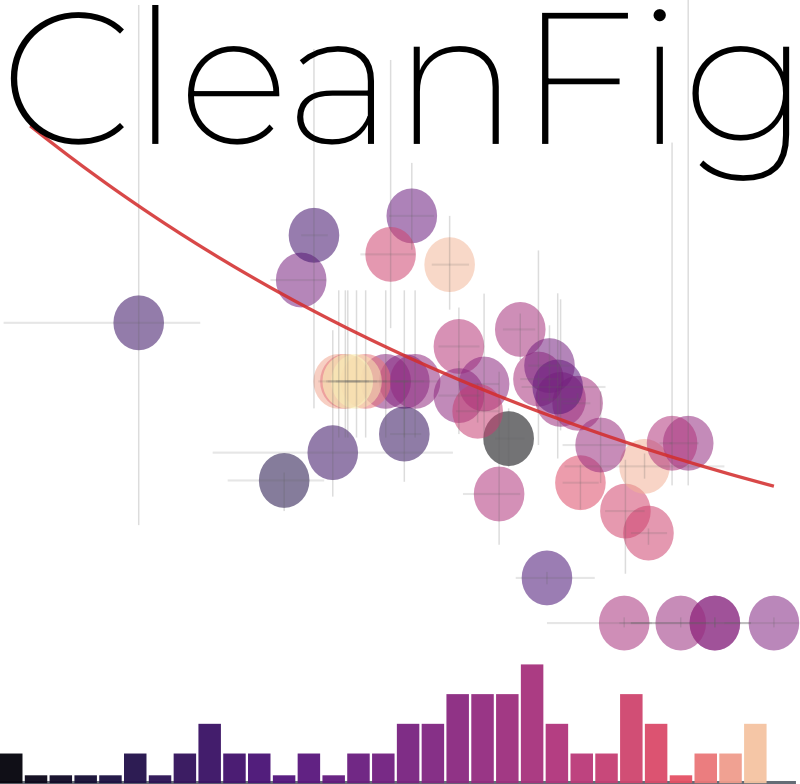
The logo is generated with cleanfig itself from the ESEC volume/mobility example.
Notes
- Dense field plots support
render="auto",render="grid", andrender="embedded". - PDF export requires the Rust backend.
- The ESEC example expects
pandasand the bundled catalog file inexamples/Data/.